| n00bfest http://www.n00bfest.com/phpBB3/ |
|
| lag stuff http://www.n00bfest.com/phpBB3/viewtopic.php?f=11&t=35740 |
Page 1 of 1 |
| Author: | Falcon [ Mon Jul 12, 2010 9:34 pm ] |
| Post subject: | lag stuff |
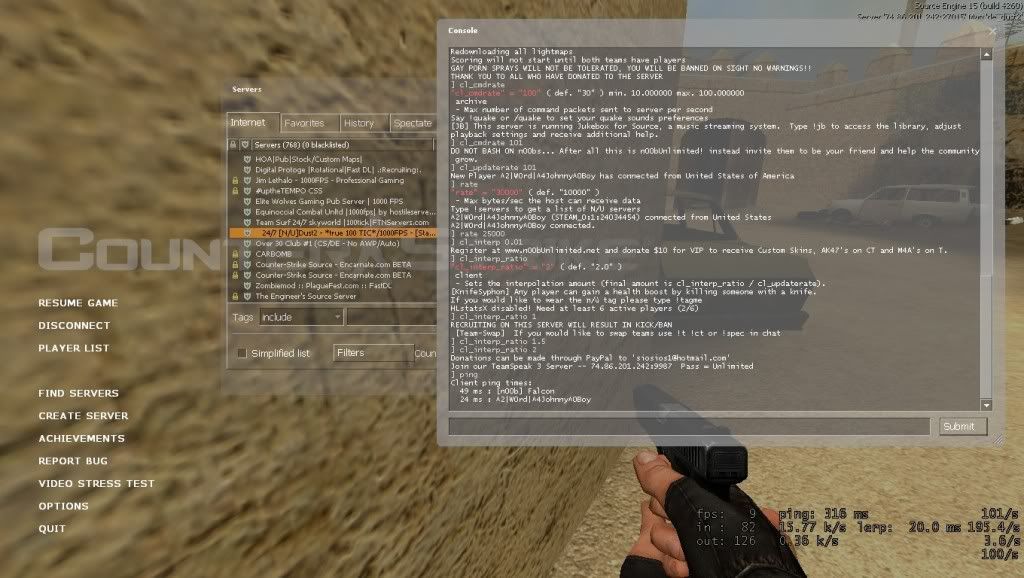
can anyone help me out with my lag issues. at first i thought it was the server, but now i think its my ISP, but i did a speed test and its running at 5.75 Mb/s download, and .94 Mb/s Upload. I did switch ISP's about 1 month ago and thats kinda when it all started happening, its ATT Uverse if that helps. basically im really confused and can only play CS for 5 min at a time before this happens. and its not just CS, its all online games has this happened to anyone else?
|
|
| Author: | snuggle [ Mon Jul 12, 2010 9:48 pm ] |
| Post subject: | Re: lag stuff |
run a trace route to see if theres any massive increases in lag along the route command prompt ---> tracert 72.249.124.50 you may time out on your second route , atleast for me that's normal. I had this problem when I came back to CSS 3-4 months ago and I really did dick all, my ISP couldn't find any problems it just solved itself. if there is a massive spike along the route maybe try contacting your ISP to boost your signal |
|
| Author: | Falcon [ Mon Jul 12, 2010 10:46 pm ] |
| Post subject: | Re: lag stuff |
heres what i got on the first time i did it: Tracing route to dallas.colocrossing.com [72.249.124.50] over a maximum of 30 hops: 1 27 ms 1 ms 1 ms homeportal [192.168.1.254] 2 22 ms 21 ms 22 ms 99-73-176-3.lightspeed.fyvlar.sbcglobal.net [99. 73.176.3] 3 22 ms 21 ms 21 ms 99.164.230.6 4 21 ms 21 ms 21 ms bb2-g3-2-0.fyv2ar.sbcglobal.net [151.164.43.0] 5 32 ms 32 ms 31 ms ppp-151-164-52-18.rcsntx.swbell.net [151.164.52. 18] 6 31 ms 31 ms 31 ms asn2828-xo.pxnyny.sbcglobal.net [151.164.248.210 ] 7 31 ms 31 ms 31 ms ae-41-90.car1.Dallas1.Level3.net [4.69.145.195] 8 32 ms 38 ms 33 ms CWIE-LLC.car1.Dallas1.Level3.net [4.59.113.70] 9 32 ms 32 ms 32 ms dallas.colocrossing.com [72.249.124.50] Trace complete. and heres when i did it again: Tracing route to dallas.colocrossing.com [72.249.124.50] over a maximum of 30 hops: 1 19 ms 1 ms 1 ms homeportal [192.168.1.254] 2 22 ms 21 ms 21 ms 99-73-176-3.lightspeed.fyvlar.sbcglobal.net [99. 73.176.3] 3 25 ms 22 ms 21 ms 99.164.230.6 4 21 ms 20 ms 21 ms bb2-g3-2-0.fyv2ar.sbcglobal.net [151.164.43.0] 5 31 ms 32 ms 31 ms ppp-151-164-52-18.rcsntx.swbell.net [151.164.52. 18] 6 32 ms 31 ms 31 ms asn2828-xo.pxnyny.sbcglobal.net [151.164.248.210 ] 7 59 ms 233 ms 148 ms ae-41-90.car1.Dallas1.Level3.net [4.69.145.195] 8 33 ms 32 ms 31 ms CWIE-LLC.car1.Dallas1.Level3.net [4.59.113.70] 9 32 ms 33 ms 32 ms dallas.colocrossing.com [72.249.124.50] Trace complete. |
|
| Author: | dirkdeagler [ Tue Jul 13, 2010 9:02 am ] |
| Post subject: | Re: lag stuff |
gaming traffic is really small compared to other things like video, so you shouldnt be getting throttled or anything like that. Your bandwidth is certainly big enough to handle cs. from your tracert looks like they've got a bad router in dallas. |
|
| Author: | Falcon [ Tue Jul 13, 2010 11:02 am ] |
| Post subject: | Re: lag stuff |
great so what do i do now? call my isp and tell them to fix there shit? or can i reroute my stuff to a different router? |
|
| Author: | dirkdeagler [ Tue Jul 13, 2010 11:25 am ] |
| Post subject: | Re: lag stuff |
i'm not too good at that type of stuff but I'd open a ticket with their (the ISP) tech support. provide the tracert if possible. Chances are though you'll spend at least a week running thru their diagnostic script. Shitty beginner stuff like restart your computer. plug your computer in. make sure the keyboard works. plug your computer directly into the router. Stick with it without getting frustrated, and be nice to your support person, and you'll get thru that and to the heart of the problem. |
|
| Author: | Falcon [ Thu Jul 29, 2010 7:24 pm ] |
| Post subject: | Re: lag stuff |
just as an update, im still having issues. although i did talk to one guy at my ISP today that says its the game server, even though i know its not... ... so now im going to blame Fomenta because it makes me feel better ![]() j/k Fomenta |
|
| Author: | Spyda [ Fri Jul 30, 2010 1:55 am ] |
| Post subject: | Re: lag stuff |
Gotta say it... LOL 9fps! |
|
| Author: | r3xx3r [ Fri Jul 30, 2010 9:03 am ] |
| Post subject: | Re: lag stuff |
have u changed anything besides ur ISP?? new software or hardware?? i havent heard much about AT&T U-Verse, but i found this through a google search. http://www.broadbandreports.com/comment/2911/64936 the specific part if this: The internet, well, it's fast DSL and it works. I have the 6Mbps/1Mbps 'Elite' tier, which was a downgrade from 10/1 on cable. One thing that I did not realize before switching to U-verse is that the DSL utilizes interleaved signalling (»en.wikipedia.org/wiki/Interleaving) for data transmission. This is great in regards to delivering the unforgiving medium of video/television over IP, however it adds a noticeable amount latency to the internet connection compared to traditional DSL service(to put this in perspective, imagine that on ADSL you would ping 10-20 to a local game server, whereas on u-verse VDSL you would ping 25-40). |
|
| Author: | Falcon [ Fri Jul 30, 2010 3:07 pm ] |
| Post subject: | Re: lag stuff |
no nothings changed on my local end. i know its something with the isp im going to give them one more call to see if i can get it fixed because honestly when its working, its working great. i too have the 6mbps package the guy in that link did, but for whatever reason i cant do shit when it comes to playing multiplayer games over the net. my ping will jump to over 500-600 after only a few min of playing and i cant fix it |
|
| Author: | r3xx3r [ Fri Jul 30, 2010 3:46 pm ] |
| Post subject: | Re: lag stuff |
Falcon wrote: no nothings changed on my local end. i know its something with the isp im going to give them one more call to see if i can get it fixed because honestly when its working, its working great. i too have the 6mbps package the guy in that link did, but for whatever reason i cant do shit when it comes to playing multiplayer games over the net. my ping will jump to over 500-600 after only a few min of playing and i cant fix it yea, he said that AT&T uses a version of DSL good TV but not Internet. im sure it also has to do with the router. u need to call them and tell them the specific router, ae-41-7 59 ms 233 ms 148 ms ae-41-90.car1.Dallas1.Level3.net [4.69.145.195] is the router. also, try typing in pathping 72.249.124.50 in command prompt. pathping is a more advanced version of tracert, it takes longer, but gives more specific info. and post the results here. |
|
| Page 1 of 1 | All times are UTC - 6 hours [ DST ] |
| Powered by phpBB © 2000, 2002, 2005, 2007 phpBB Group http://www.phpbb.com/ |
|